Shared WhatsApp inbox — for professional firms

WhatsApp for the firm.Archived, shared, yours.

Openline puts the firm’s WhatsApp numbers into one inbox the whole team works from, with a permanent archive on servers in Europe. You keep your numbers.

Archive
permanent, in Europe
Roles
owner · admin · operator
Retention
30–3650 days, or forever
Trial
30 days
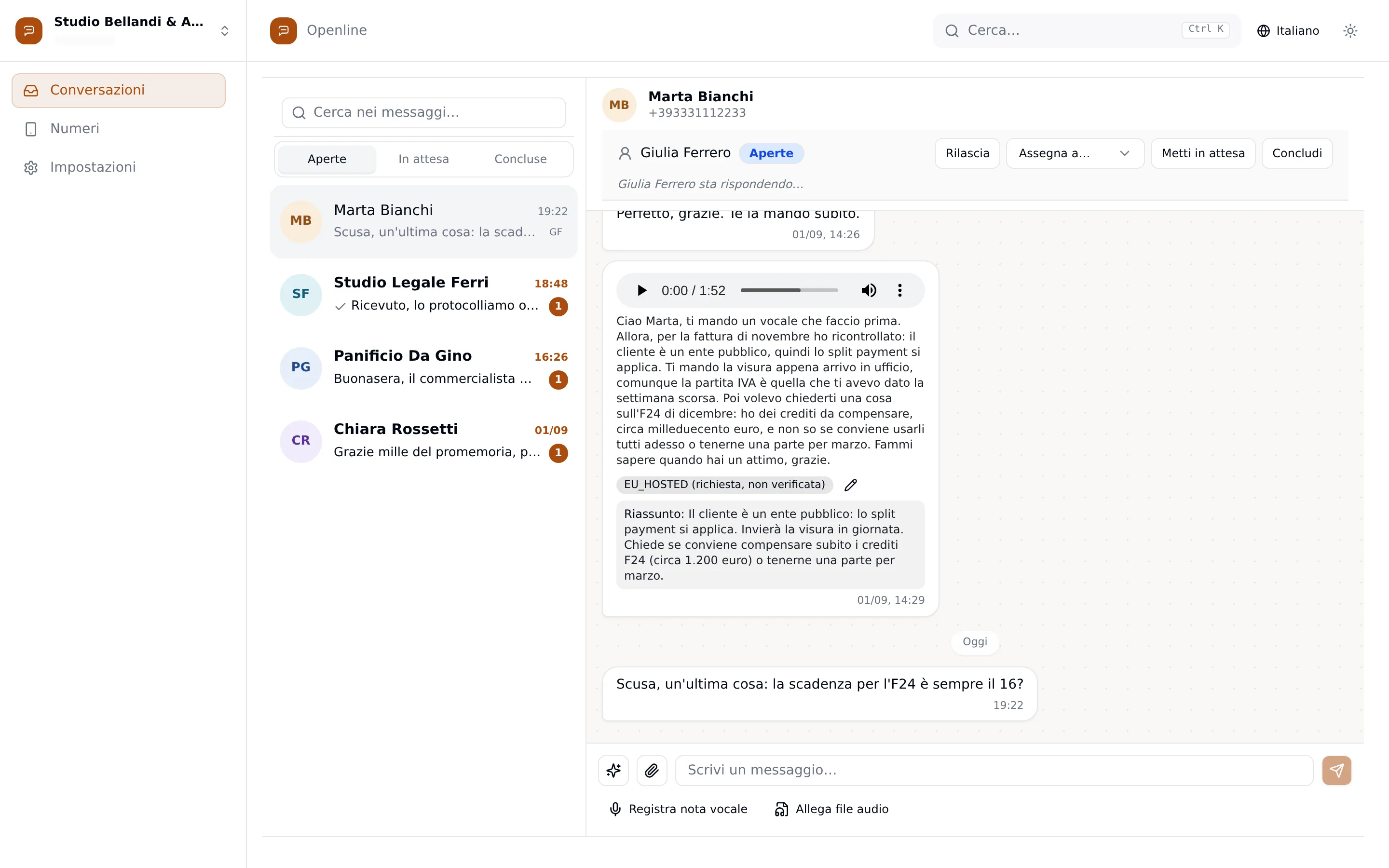
The Openline inbox: on the left the list of conversations with unread counts, on the right the chat with Marta Bianchi — a voice note transcribed and summarised, the line “Giulia Ferrero is replying…” and the Release, Assign to, Put on hold and Close controls.
A real capture of the inbox — demo data, no real client

Measured, not claimed

Four things written in the code.

Retention
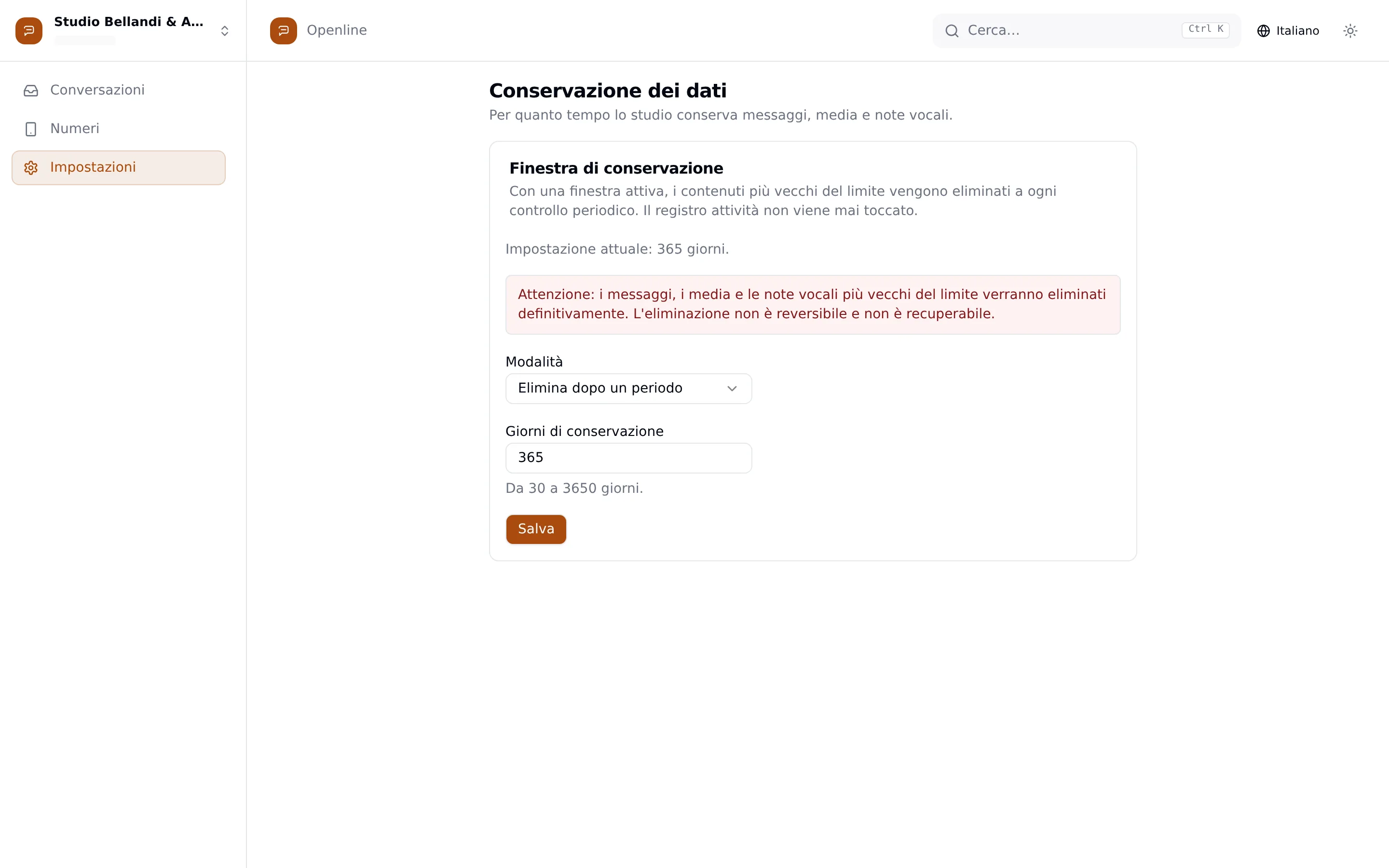
30–3650 daysor forever. Only the firm’s owner sets it, and every change is logged.
Export
never blockedthe full archive downloads even after the licence expires. The data is the firm’s.
Activity log
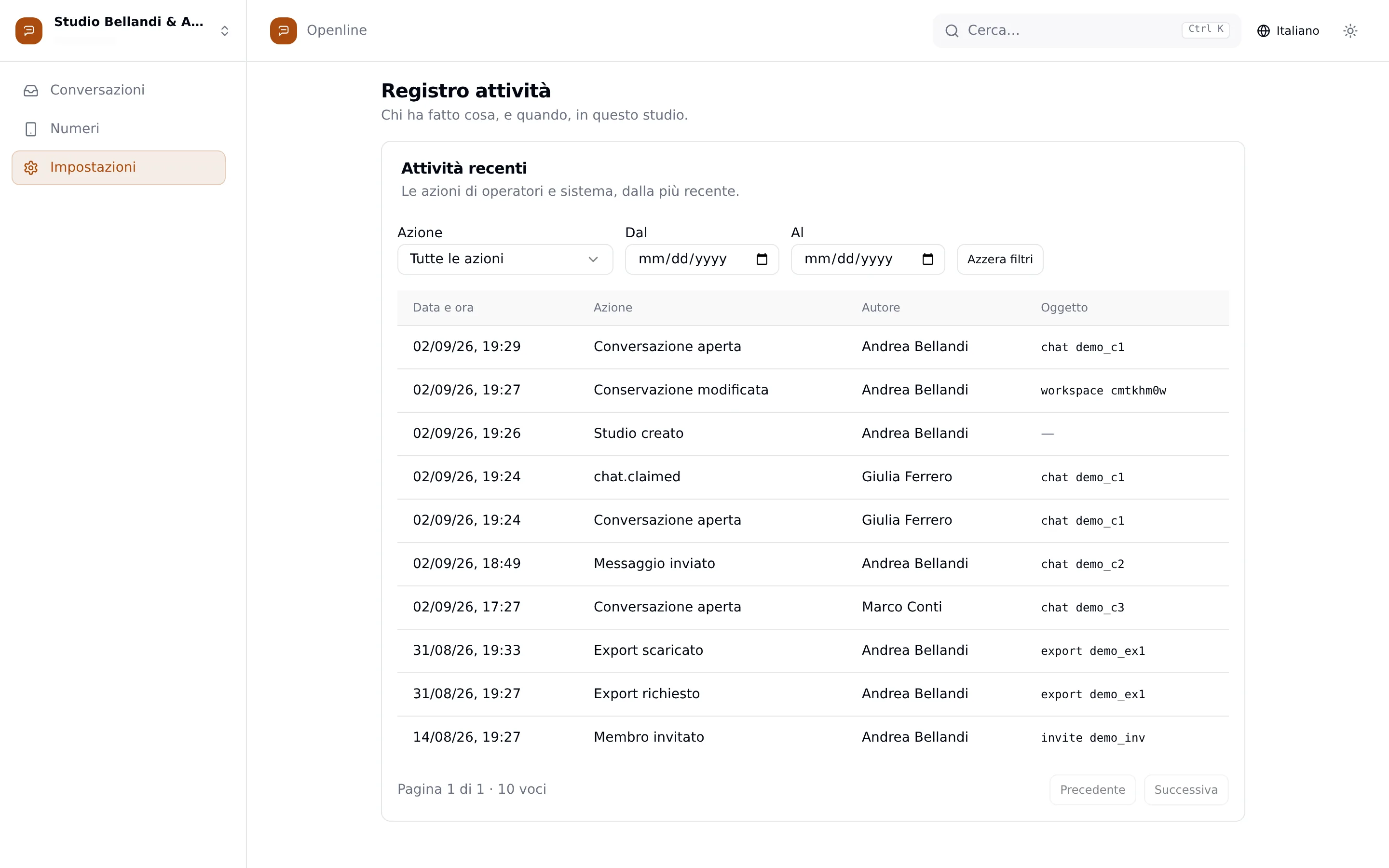
append-onlywho opened, sent, exported. There is no function to edit or delete it.
Limits
25 MB · 90 sattachments up to 25 MB; voice notes from 90 seconds up arrive with a summary.
A message arrives

From the client’s phone to the right colleague.

Four things happen, in this order. None of them needs a forward.

  1. It lands on the firm’s number

    The message reaches the shared number and is archived the moment it passes through: text, documents, voice notes, groups.

  2. Everyone sees it

    It shows up in the shared list with an unread badge for each person. Nobody has to screenshot a chat to a colleague.

  3. Giulia takes it

    One click claims the conversation. A second claim on the same chat is refused, not duplicated.

  4. Her colleagues see her typing

    “Giulia is replying…” appears for everyone before anyone else starts. The reply goes out with delivery ticks.

On desktop the scene follows your scroll. On a phone, or with reduced motion, it is simply complete.

One inbox, the whole team.

Every number the firm links, every conversation, in one list you work on together.

Take-over without collisions
A conversation has one responsible person. Claiming is atomic: two people cannot take the same chat.
Open, on hold, closed
Three states, three tabs. A closed chat reopens by itself when the client writes again.
Unread, per person
The unread count is yours, not the firm’s: what a colleague read does not vanish from your list.
The Openline inbox at full width: conversation list with per-person unread counts and the chat with Marta Bianchi open, with the assignment controls.
The inbox, full screen — a capture, not a mockup

Between two colleagues

Who has it, and who had it before.

Three things that can happen to a conversation, and what the history records each time.

Who has it, and who had it before.
MBMarta BianchiOpen
ResponsibleGFGiulia Ferrero
History
  • Taken over · Giulia Ferrero

Giulia takes the conversation

One click on “Take over”. From then on the chat carries her name in the list and at the top of the thread.

MBMarta BianchiOpen
ResponsibleMCMarco Conti
History
  • Taken over · Giulia Ferrero
  • Reassigned · Giulia Ferrero → Marco Conti

The owner passes it to Marco

Owners and admins can assign any conversation to anyone: “Assign to…” and the responsible person changes, with the trace.

MBMarta BianchiOpen
ResponsibleGFGiulia Ferrero
History
  • Taken over · Giulia Ferrero
  • Refused · already taken by Giulia Ferrero

Marco tries while Giulia has it

The second claim is refused with a clear message. Nobody works the same chat twice without knowing it.

Voice notes become text. Replies start as drafts.

The AI works on what arrives, never on what leaves: sending is always the operator’s.

Transcribed on arrival
Every incoming voice note becomes text on its own. You can correct it by hand, and the correction stays.
Summarised from 90 seconds
The long ones arrive with their summary. The short ones do not need one.
Draft, summary, translation
Built on the last messages of the chat. The operator reads, edits, sends — or discards.
A switch and a ceiling
The AI turns off for the whole firm with one switch, and has a daily spend ceiling. It runs on Altovar’s own gateway, in the EU.
Voice notes become text. Replies start as drafts.
MBMarta Bianchi · voice note · 1:52

Hi Marta, sending a voice note, it’s quicker. So, about November’s invoice I checked again: the client is a public body, so split payment applies. I’ll send the company extract as soon as I’m in the office…

corrected by hand
Summary

The client is a public body: split payment applies. She will send the company extract today. Asks whether to offset the F24 credits now (about 1,200 euro) or keep part for March.

Draft reply

Hi Marta, confirmed: with a public body the split payment applies. Send me the extract when you can. On the F24 credits: offset about 700 now and keep the rest for March.

Check the figures cited before sending.

The numbers you already have.

Openline links to the firm’s WhatsApp numbers by scanning a QR code. Nothing installed on the server, nothing on colleagues’ phones.

Restricted visibility
A number can be limited to the colleagues who need it: whoever should not see a file, does not see it. Owners and admins always do.
Roles, not passwords shared around
Owner, admin, operator. Each person signs in with their own account; the firm decides who reaches which number.
A watched link
If a number is down, the inbox says so and sending stops — instead of a message that seems sent and never left.
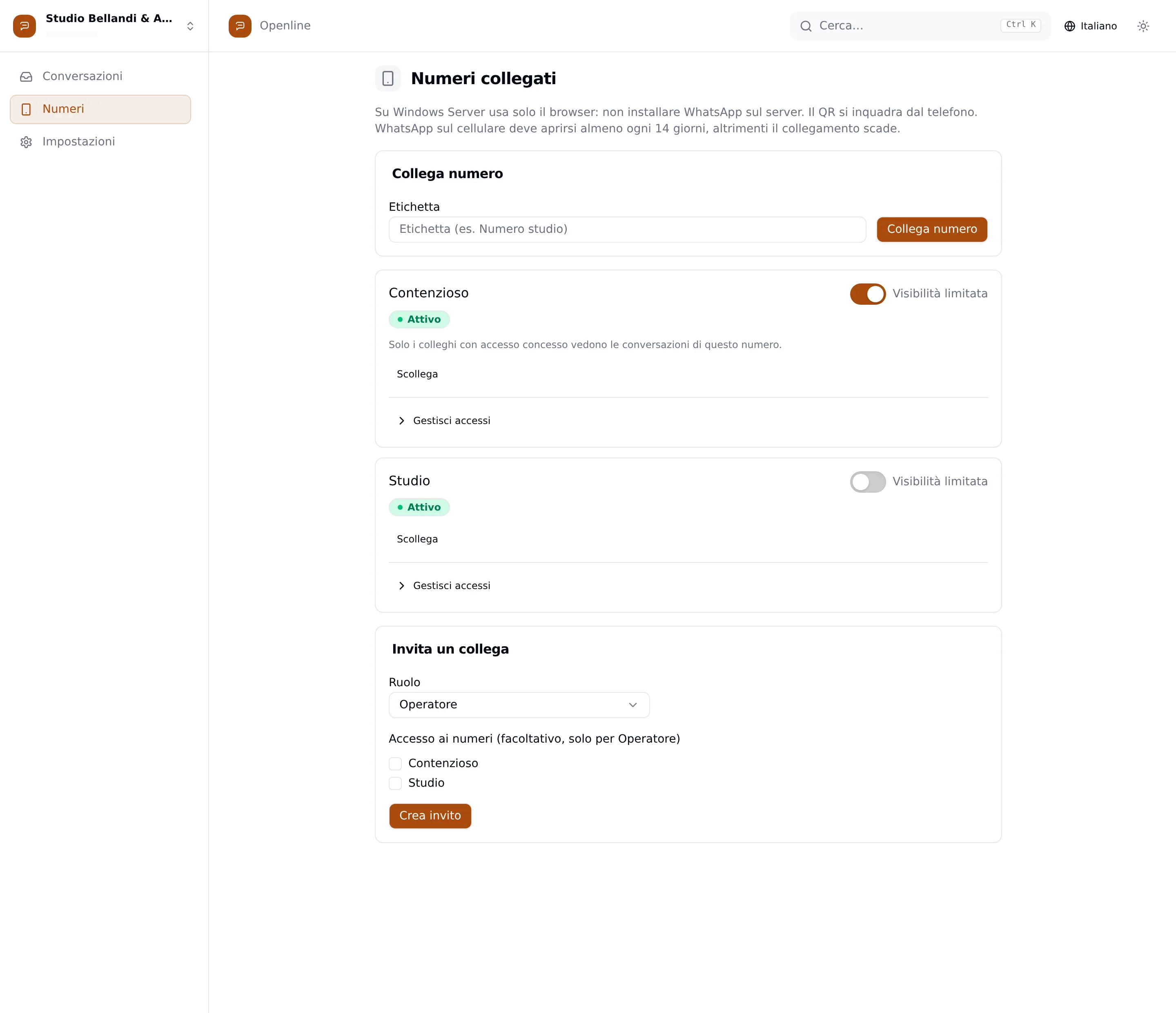
The Linked numbers page: two firm numbers, one with the “Restricted visibility” switch on, the Manage access panel and the form to invite a colleague choosing role and numbers.
Linked numbers — visibility per number, roles per person

Control

The firm’s data, treated as the firm’s.

Rules, not promises. Each of these is a screen in the product.

Hosted in the European Union
Messages, voice notes and documents on servers in Germany, on infrastructure we run.
Configurable retention
From 30 days to 10 years, or forever. The owner decides; the activity log is never touched.
Complete export
The whole history in a ZIP with open formats. Never blocked, not even with an expired licence.
Activity log
Who opened, sent, exported: every relevant action, in a record that cannot be edited or deleted.
AI you can turn off
One switch for the whole firm, a daily spend ceiling, and every change in the log.
Processing agreement, in draft
The GDPR art. 28 appointment and the list of sub-processors are public. Still in legal review — and it says so.
The Data retention page: window set to 365 days, the irreversibility warning, the “Delete after a period” mode and the days field with its 30–3650 limit.
Data retention — from 30 to 3650 days, the owner decides
The Activity log page: a filterable table of actions with date, action, author and object — conversations opened, messages sent, exports requested and downloaded.
Activity log — append-only

Openline connects to WhatsApp through an unofficial integration. Openline is not affiliated with, nor endorsed by, Meta Platforms, Inc.; WhatsApp is a trademark of its owners.

See Openline on your firm.

A guided demo on your cases: terminal servers, restricted numbers, clients’ voice notes. Write to us and we set it up.

[email protected]